Getting Started
Build your registry
- Select "MHACBO Registry" from the side menu.
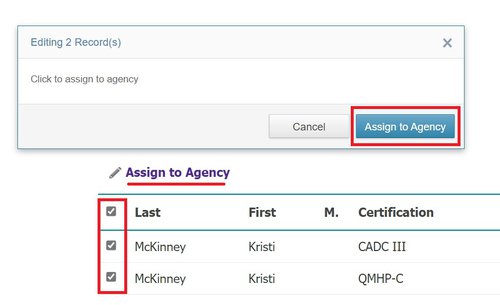
- To assign an individual, select the checkbox next ot their name, and click "Assign to Agency" at the top of the MHACBO registry
- .
Manage your registry
- Select "Agency Registry" from the side menu
- Any individuals you've added will be displasyed here
- Click "View Details" next to a person's name
-

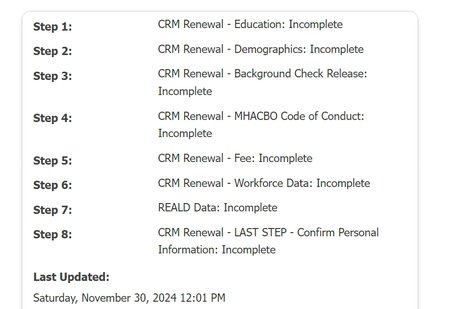
- Any credentials which are renewalable will contain the progress of the current renewal application
-
New Certifications
-

- This menu item will notify you if an individual in your registry obtains a new credental which you aren't tracking
- Click the number under "New Certs" to view the list
- Select "Assign" to add these individuals to your Agency Registry
-

Analytics
- The analytics page is currently under contruction, but it will build an analytics breakdown of your agency as staff as assigned
Jobs
- Your agency can now post directly to the MHACBO jobs page through the Employer Portal. Positions posted will be visible across all users inside of your agency.
Previous Staff
- This menu allows you to re-assign individuals who you have previously removed from your registry.
Admin
- Use the Admin tab to update your agency details (used for Job's Submissions) and to add new staff to the Portal.